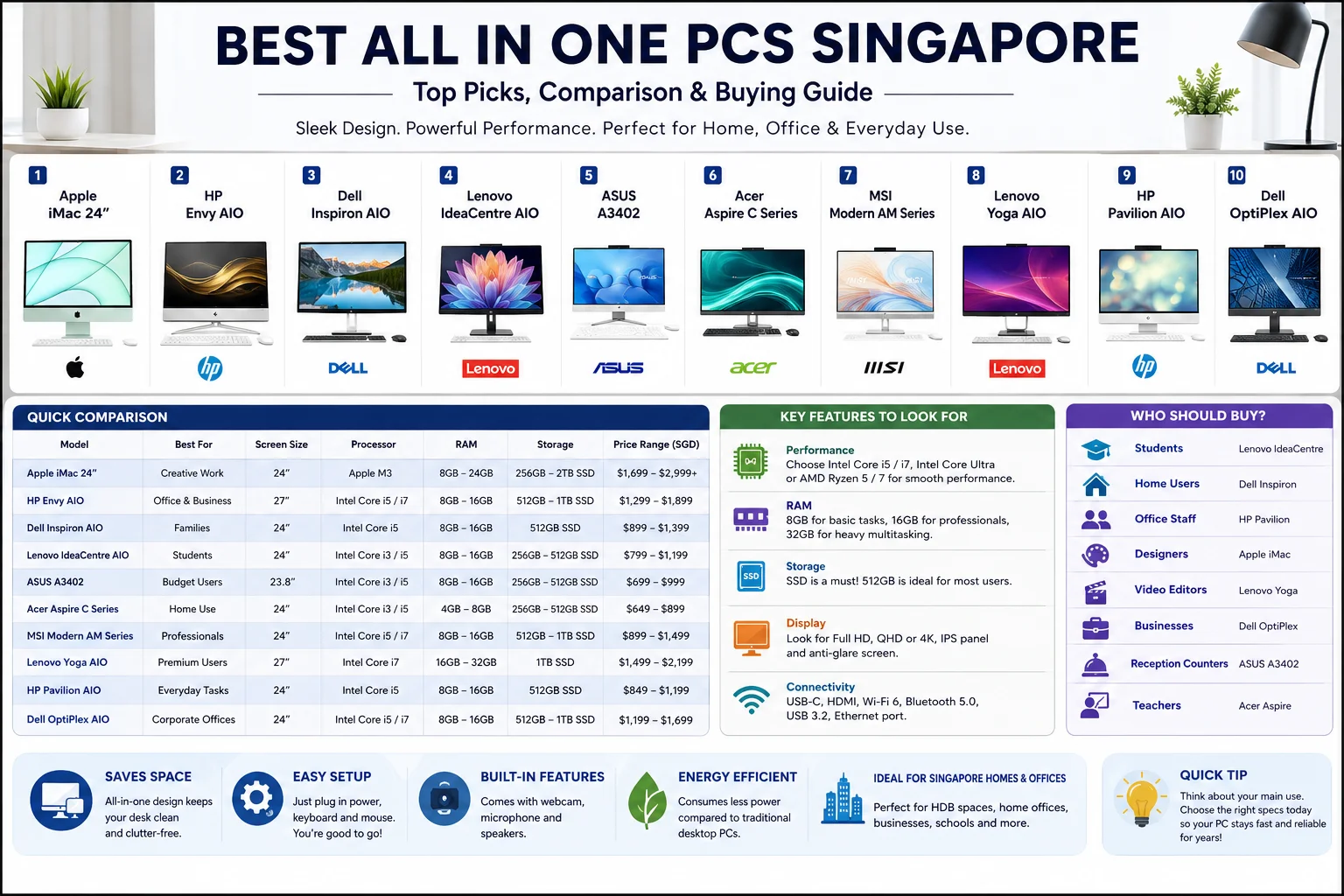
Best All In One PCs Singapore: 10 Excellent Choices for Every Need
Desktop computers haven’t disappeared. They simply evolved.
Walk into a modern Singapore office, tuition centre, reception area, or even many HDB homes and you’ll notice something different. Instead of bulky CPU towers sitting under desks, many people now use sleek all-in-one desktops. Everything is built behind the screen. Fewer cables. Less clutter. Much cleaner.
That’s exactly why the Best All In One PCs Singapore continue to grow in popularity.
Whether you’re working from home, running a business, attending online classes, editing photos, or simply browsing the internet, an all-in-one PC can deliver excellent performance without taking over your workspace.
But…not every model is worth your money.
Some focus on productivity, while others are built for creative professionals. A few offer premium displays, and others are perfect if you’re shopping on a budget.
This guide covers the Best All In One PCs Singapore available today and explains what actually matters before buying one.
Why Choose an All-In-One PC?
An all-in-one desktop combines the monitor and computer into a single device.
No large tower.
No extra mess.
Just connect the power cable, keyboard, and mouse…and you’re ready.
People in Singapore love these systems because apartments, home offices, and commercial spaces often benefit from saving space.
Some key advantages include:
- Clean and modern design
- Minimal cable clutter
- Quick setup
- Built-in webcam and speakers
- Less desk space required
- Energy efficient
- Perfect for homes and offices
Quick Comparison Table
| All-In-One PC | Best For | Screen Size | Performance |
|---|---|---|---|
| Apple iMac 24″ | Creative Work | 24″ | Excellent |
| HP Envy All-in-One | Office & Business | 27″ | Excellent |
| Dell Inspiron AIO | Families | 24″ | Very Good |
| Lenovo IdeaCentre AIO | Students | 24″ | Very Good |
| ASUS A3402 | Budget Users | 23.8″ | Good |
| Acer Aspire C Series | Home Use | 24″ | Good |
| MSI Modern AM Series | Professionals | 24″ | Excellent |
| Lenovo Yoga AIO | Premium Users | 27″ | Excellent |
| HP Pavilion AIO | Everyday Tasks | 24″ | Very Good |
| Dell OptiPlex AIO | Corporate Offices | 24″ | Excellent |
1. Apple iMac 24″
Apple’s iMac remains one of the strongest choices for people who want beautiful design and outstanding speed.
Its Retina display looks incredible, making it ideal for designers, photographers, video editors, and content creators.
The Apple Silicon processor also delivers impressive performance while staying quiet.
If you’re looking for premium quality, this easily belongs among the Best All In One PCs Singapore.
Best For
- Graphic designers
- Video editors
- Students
- Professionals
2. HP Envy All-in-One
HP has built a powerful desktop that balances work and entertainment.
The large display offers plenty of room for multitasking, while the latest Intel processors handle demanding applications smoothly.
Many Singapore businesses choose this model because it’s reliable and easy to maintain.
3. Dell Inspiron All-in-One
Dell focuses on practicality.
This desktop works well for home users, remote workers, students, and families.
Video calls look clear thanks to the built-in webcam, while the performance easily handles Office applications, browsing, streaming, and school work.
It’s another strong option among the Best All In One PCs Singapore.
4. Lenovo IdeaCentre AIO
Lenovo has become a trusted brand for affordable productivity.
The IdeaCentre series provides excellent value without sacrificing quality.
Its slim frame fits nicely into smaller apartments, making it popular with Singapore homeowners.
5. ASUS A3402
Not everyone needs a high-end workstation.
Sometimes you simply want a dependable computer for emails, online banking, Zoom meetings, and everyday tasks.
That’s exactly where ASUS performs well.
The A3402 delivers solid performance while remaining affordable.
6. Acer Aspire C Series
Acer offers one of the better entry-level all-in-one desktops.
Students, seniors, and families often choose this model because it’s simple to use and doesn’t require complicated setup.
Its Full HD display is sharp enough for movies, web browsing, and office work.
7. MSI Modern AM Series
MSI isn’t only about gaming anymore.
Their Modern series targets professionals who need dependable performance throughout the day.
Whether you’re working with spreadsheets, presentations, accounting software, or multiple browser tabs, this system handles everything comfortably.
8. Lenovo Yoga AIO
The Yoga series looks premium…
And it feels premium too.
With an impressive display, stylish stand, and powerful specifications, it’s perfect for executives and creative professionals who want something that stands out.
Among the Best All In One PCs Singapore, this is definitely one of the most elegant choices.
9. HP Pavilion All-in-One
HP Pavilion sits nicely between budget and premium.
You receive modern styling, reliable hardware, and enough performance for almost every daily activity.
It’s a sensible option if you’re upgrading from an older desktop.
10. Dell OptiPlex All-in-One
Businesses across Singapore have trusted Dell OptiPlex desktops for years.
The all-in-one version keeps the same reliability while saving valuable office space.
It also offers excellent security features, making it popular with companies and government offices.
Buying Guide: What Should You Look For?
Choosing the Best All In One PCs Singapore isn’t only about the processor.
Several other factors matter just as much.
Processor
Look for:
- Intel Core i5 or higher
- Intel Core Ultra processors
- AMD Ryzen 5 or Ryzen 7
- Apple Silicon processors
These provide smooth performance for years.
RAM
At least:
- 8GB for casual users
- 16GB for professionals
- 32GB for creative work
Storage
Solid State Drives (SSD) make a huge difference.
A 512GB SSD is usually the sweet spot for most buyers.
Display
Since you cannot easily replace the monitor, choose carefully.
Many of the Best All In One PCs Singapore offer:
- Full HD
- QHD
- 4K Retina
- IPS Panels
- Anti-glare screens
Connectivity
Make sure your desktop includes:
- USB-C
- HDMI
- Wi-Fi 6
- Bluetooth
- USB 3.2
- Ethernet
Which Users Should Buy an All-in-One PC?
| User | Recommended Choice |
|---|---|
| Students | Lenovo IdeaCentre |
| Home Users | Dell Inspiron |
| Office Staff | HP Pavilion |
| Designers | Apple iMac |
| Video Editors | Lenovo Yoga |
| Businesses | Dell OptiPlex |
| Reception Counters | ASUS A3402 |
| Teachers | Acer Aspire |
Are All-In-One PCs Good for Gaming?
They can handle light gaming.
Games like Minecraft, The Sims, Valorant, and League of Legends generally run well on higher-end models.
However, if gaming is your main priority, a dedicated gaming desktop usually provides better graphics performance and upgrade options.
How Long Do All-In-One PCs Last?
Most quality models last between five and eight years with proper care.
Regular software updates, enough RAM, and SSD storage help keep the system running smoothly for much longer.
That’s another reason why investing in one of the Best All In One PCs Singapore can be worthwhile.
Final Thoughts
The Best All In One PCs Singapore offer an ideal mix of performance, style, and convenience. Whether you’re setting up a productive home office, upgrading your family’s desktop, or equipping a business workspace, there’s an option to suit almost every budget.
Think about how you’ll use the computer before making a decision. A student won’t need the same specifications as a graphic designer, and a reception desk doesn’t require the same power as a video editing workstation.
Choose wisely, invest in a trusted brand, and you’ll likely enjoy a cleaner desk, quieter workspace, and reliable performance for years to come.
What is the best all-in-one PC for home use in Singapore?
Dell Inspiron, HP Pavilion, and Lenovo IdeaCentre are excellent choices for home users because they offer a good balance of performance, design, and value.
Are all-in-one PCs worth buying?
Yes. They save space, reduce cable clutter, and provide excellent performance for everyday work, studying, entertainment, and business use.
Which brand makes the Best All In One PCs Singapore?
Apple, Dell, HP, Lenovo, ASUS, Acer, and MSI all manufacture reliable all-in-one desktops suitable for different budgets and requirements.
Can I upgrade an all-in-one PC?
Some models allow RAM and storage upgrades, but many have limited upgrade options compared to traditional desktop computers.
Is an all-in-one PC better than a laptop?
If portability isn’t important, an all-in-one PC usually offers a larger display, better cooling, improved ergonomics, and a more comfortable working experience.

Global Arena is a Singapore-focused SEO and digital marketing brand with a network of 25+ publisher websites, helping businesses strengthen their online presence through guest posting, link building, content marketing, and digital PR.
For collaborations, publishing opportunities, or business inquiries:
Hamza@globalarena.org | WhatsApp: +971 52 399 4589