Best Gaming Webcams Singapore: Top Picks for Streamers, Gamers & Content Creators
Gaming has changed a lot over the last few years. It isn’t only about playing your favourite games anymore. Many gamers now stream on Twitch, upload gameplay to YouTube, join esports tournaments, or simply chat with friends on Discord. And if you want people to see you clearly, investing in one of the best gaming webcams Singapore has become almost essential.
A good webcam can instantly improve your stream quality. Better lighting, sharper video, smoother frame rates… people notice these things. You don’t need the most expensive model either. Singapore has plenty of excellent gaming webcams that fit different budgets.
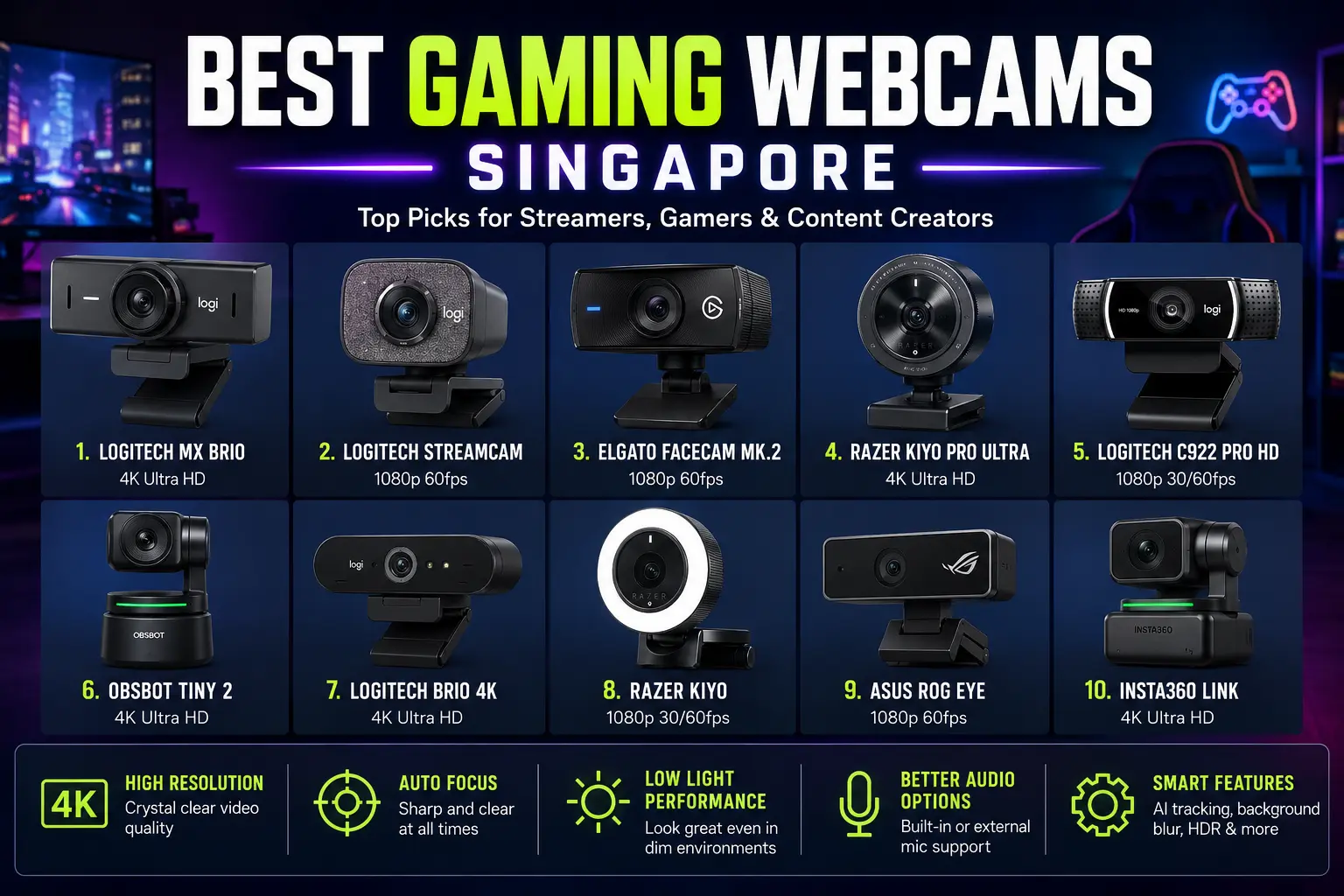
Here’s our list of the best gaming webcams Singapore gamers should consider this year.
1. Logitech MX Brio
The Logitech MX Brio is one of the newest premium webcams available today. Built with a large image sensor and stunning 4K resolution, it delivers crystal-clear video for professional streamers and creators.
Colours look natural, autofocus works quickly, and low-light performance is excellent. Even if your gaming room isn’t perfectly lit, your viewers will still see a sharp image.
Best for:
- Professional streamers
- YouTube creators
- Twitch broadcasting
- High-quality video meetings
2. Logitech StreamCam
The Logitech StreamCam remains one of the most popular choices among gamers.
It records smooth Full HD video at 60fps, making gameplay streams look much more natural than ordinary 30fps webcams. Face tracking works surprisingly well too.
Another bonus? Portrait mode support for TikTok, Instagram Reels, and YouTube Shorts.
Pros
- Smooth 1080p 60fps recording
- Excellent autofocus
- Great microphone quality
- USB-C connection
3. Elgato Facecam MK.2
Elgato designed this webcam specifically for gamers.
Unlike office webcams, the Facecam focuses on producing professional-looking streaming video. It captures excellent colours, sharp details, and offers manual controls that many streamers appreciate.
It doesn’t include a microphone, but most gamers already use dedicated gaming headsets or USB microphones anyway.
This easily deserves a place among the best gaming webcams Singapore.
4. Razer Kiyo Pro Ultra
Razer understands gamers better than most companies.
The Kiyo Pro Ultra features one of the largest webcam sensors currently available. That means brighter images, cleaner backgrounds, and fantastic image quality during night-time gaming sessions.
Background blur looks almost DSLR-like.
If your budget allows it… this webcam is seriously impressive.
5. Logitech C922 Pro HD
For years, the Logitech C922 has been recommended by beginner streamers.
And honestly—it still performs extremely well.
You get reliable Full HD recording, decent microphones, autofocus, and excellent software support. It works perfectly with OBS Studio, Streamlabs, Discord, Zoom, Microsoft Teams, and almost every streaming platform.
Many Singapore gamers still choose this model because it simply works.
6. OBSBOT Tiny 2
The OBSBOT Tiny 2 brings something different.
It automatically follows your movements using AI-powered tracking. If you’re constantly moving around while streaming, recording tutorials, or creating reaction videos, this feature becomes incredibly useful.
Gesture controls also allow hands-free zooming and tracking.
It’s definitely one of the smartest options in the best gaming webcams Singapore category.
7. Logitech Brio 4K
The Logitech Brio has been a favourite among professionals for years.
It records ultra-sharp 4K video while supporting HDR for better lighting balance. Facial recognition through Windows Hello is another useful bonus.
For gamers who also work remotely, this webcam serves both purposes very well.
8. Razer Kiyo
The original Razer Kiyo remains popular because of one simple feature.
Built-in ring lighting.
Many gamers don’t own expensive studio lights. The integrated LED ring helps brighten your face without needing extra equipment.
It’s simple, affordable, and surprisingly effective.
9. ASUS ROG Eye
ASUS built the ROG Eye with gamers in mind.
It supports Full HD at 60fps and features a compact design that’s easy to carry between gaming events or LAN tournaments.
Its sleek appearance also matches most RGB gaming setups.
For ROG fans, it’s an excellent addition.
10. Insta360 Link
The Insta360 Link isn’t just another webcam.
Using a built-in gimbal, it follows your movements smoothly while keeping you perfectly centred. Video quality is outstanding, especially for streamers who like demonstrating products or recording tutorials.
Its AI features continue improving through software updates.
It’s easily one of the premium choices among the best gaming webcams Singapore.
How to Choose the Best Gaming Webcam
Buying a webcam sounds easy…
But there are several things worth checking before spending your money.
Video Resolution
A minimum of 1080p is recommended today.
If you regularly upload YouTube videos or create premium content, 4K recording provides much more flexibility during editing.
Frame Rate
For gaming, 60fps looks much smoother than 30fps.
Fast movements appear natural, making your stream feel more professional.
Autofocus
Good autofocus keeps your face sharp throughout your stream.
Older webcams often lose focus whenever you move.
Low-Light Performance
Not every gaming room has professional lighting.
Choosing a webcam with excellent low-light performance will noticeably improve your video quality.
Built-in Microphone
Some webcams include quality microphones.
Still, most serious gamers in Singapore prefer dedicated USB microphones or gaming headsets for clearer audio.
Software Features
Modern webcams often include useful software like:
- Background blur
- AI tracking
- Face exposure adjustment
- HDR
- Auto framing
- Colour correction
These features make streaming much easier.
Why Gamers in Singapore Are Upgrading Their Webcams
Streaming has become incredibly competitive.
Viewers expect better production quality than they did a few years ago. Even casual creators now use proper lighting, microphones, and HD webcams.
And it’s not only about Twitch anymore.
Gaming webcams are used for:
- Twitch streaming
- YouTube videos
- Discord calls
- Facebook Gaming
- TikTok Live
- Online tournaments
- Remote work
- Virtual meetings
A quality webcam can improve every one of these activities.
Final Thoughts
Finding the best gaming webcams Singapore doesn’t have to be difficult.
If you’re just getting started, the Logitech C922 and Razer Kiyo offer fantastic value without costing too much. Mid-range buyers should seriously consider the Logitech StreamCam or ASUS ROG Eye. For creators who want premium quality, the Logitech MX Brio, Elgato Facecam MK.2, Insta360 Link, and Razer Kiyo Pro Ultra deliver outstanding performance.
Pick a webcam that matches your budget, gaming setup, and streaming goals. A great webcam won’t automatically make you a successful creator… but it definitely helps you make a stronger first impression.
Frequently Asked Questions
Which is the best gaming webcam Singapore for beginners?
The Logitech C922 Pro HD is one of the best beginner-friendly gaming webcams thanks to its affordable price, reliable performance, and easy setup.
Is a 4K webcam necessary for gaming?
Not always. Full HD 1080p is enough for most Twitch and YouTube streams. A 4K webcam is useful if you create high-quality videos or want more editing flexibility.
Are 60fps webcams better for streaming?
Yes. A 60fps webcam produces smoother video, making your gameplay and movements appear much more natural.
Which webcam performs best in low light?
The Razer Kiyo Pro Ultra and Logitech MX Brio offer excellent low-light performance, making them ideal for gaming rooms with limited lighting.
Can I use a gaming webcam for work and online meetings?
Absolutely. Most gaming webcams work perfectly with Zoom, Microsoft Teams, Google Meet, and other video conferencing platforms while also delivering excellent streaming quality.

Global Arena is a Singapore-focused SEO and digital marketing brand with a network of 25+ publisher websites, helping businesses strengthen their online presence through guest posting, link building, content marketing, and digital PR.
For collaborations, publishing opportunities, or business inquiries:
Hamza@globalarena.org | WhatsApp: +971 52 399 4589