Best Gaming PC Builds Singapore: Top Picks for Every Budget in 2026
If you’re searching for the Best Gaming PC Builds Singapore, you’re probably looking for a system that delivers smooth gameplay, lasts for years, and gives good value for your money. The good news? Building or buying the right gaming PC has become much easier than it was a few years ago.
The gaming community in Singapore keeps growing. New AAA games, esports titles, streaming, content creation… all of them need reliable hardware. But not everyone needs the same PC. A student playing Valorant has different needs than someone editing 4K videos after gaming sessions.
That’s why this guide covers the Best Gaming PC Builds Singapore for different budgets and gaming styles. Whether you’re building your first PC or upgrading an old setup, you’ll find something that fits.
Why Choose a Custom Gaming PC?
Many gamers in Singapore still wonder whether they should buy a pre-built desktop or build one themselves.
Honestly… both options work.
A custom build usually offers better performance for the money. You can choose every component, upgrade later, and avoid paying for parts you don’t need.
Pre-built gaming PCs, on the other hand, save time and often include warranty support.
If your goal is finding the Best Gaming PC Builds Singapore, understanding your budget matters far more than choosing between custom and pre-built.
Things to Consider Before Building a Gaming PC
Before buying parts, think about these factors.
Your Budget
Gaming PCs come in every price range.
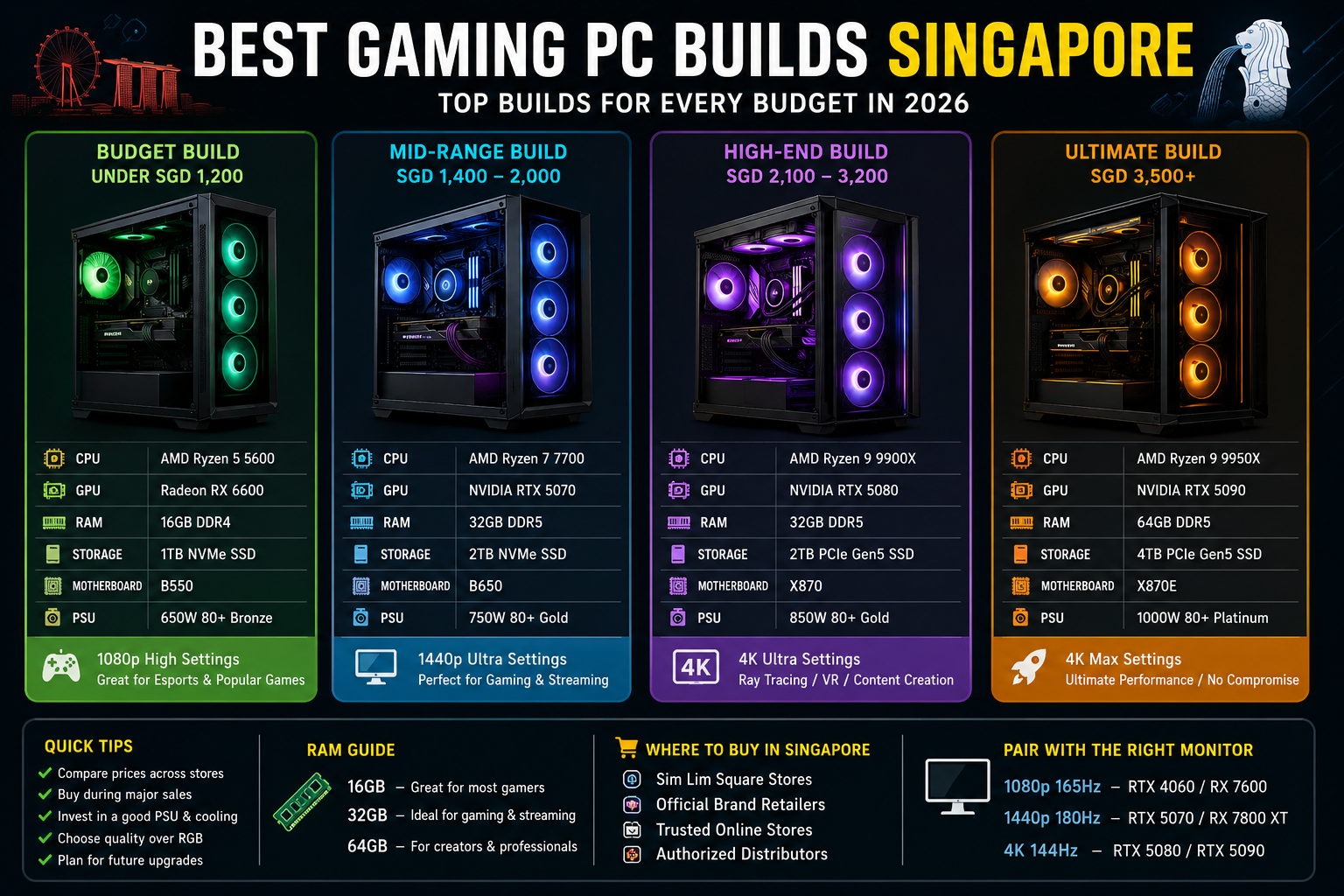
- Entry Level: SGD 900–1,300
- Mid Range: SGD 1,400–2,000
- High End: SGD 2,100–3,200
- Enthusiast Build: SGD 3,500+
Don’t overspend on parts you won’t fully use.
Games You Play
Different games have different hardware requirements.
Competitive games like CS2, Valorant, League of Legends, and Dota 2 run well on affordable systems.
AAA titles like Cyberpunk 2077, Black Myth: Wukong, Starfield, and Microsoft Flight Simulator demand much stronger graphics cards.
Choosing the Best Gaming PC Builds Singapore starts with knowing what you’ll actually play.
Future Upgrades
Leave room for upgrades.
A quality motherboard and power supply can easily support future GPUs, extra storage, or more RAM.
That saves money later.
Best Gaming PC Builds Singapore Under SGD 1,200
This build is perfect for beginners.
Recommended Parts
- CPU: AMD Ryzen 5 5600
- GPU: Radeon RX 6600
- RAM: 16GB DDR4
- Storage: 1TB NVMe SSD
- Motherboard: B550
- Power Supply: 650W 80+ Bronze
- Case: Airflow Mid Tower
Performance
This setup easily handles:
- Valorant
- Counter-Strike 2
- Fortnite
- Apex Legends
- Rainbow Six Siege
Most games run well at 1080p with high settings.
For many gamers, this is already one of the Best Gaming PC Builds Singapore if budget matters most.
Best Mid-Range Gaming PC Build Singapore
This is where performance and value meet.
Recommended Parts
- CPU: AMD Ryzen 7 7700
- GPU: NVIDIA GeForce RTX 5070
- RAM: 32GB DDR5
- Storage: 2TB NVMe SSD
- Motherboard: B650
- Power Supply: 750W Gold
- CPU Cooler: Dual Tower Air Cooler
Performance
Expect excellent results in:
- Call of Duty
- Elden Ring
- Diablo IV
- Helldivers 2
- Hogwarts Legacy
Gaming at 1440p becomes incredibly smooth.
Streaming also feels effortless.
For most users, this represents one of the Best Gaming PC Builds Singapore available today.
Best High-End Gaming PC Build Singapore
If you want premium gaming without compromises…
This is the sweet spot.
Recommended Parts
- CPU: AMD Ryzen 9 9900X
- GPU: NVIDIA GeForce RTX 5080
- RAM: 32GB DDR5
- Storage: 2TB PCIe Gen5 SSD
- Motherboard: X870
- PSU: 850W Gold
- Liquid CPU Cooler
Performance
Perfect for:
- Ultra settings
- Ray tracing
- 4K gaming
- VR gaming
- Professional streaming
- Video editing
Games stay smooth even with every visual option enabled.
Many enthusiasts searching for the Best Gaming PC Builds Singapore eventually choose something close to this configuration.
Ultimate Gaming PC Build Singapore
Money isn’t a concern?
Then go all in.
Recommended Components
- AMD Ryzen 9 9950X
- NVIDIA RTX 5090
- 64GB DDR5 RAM
- 4TB PCIe Gen5 SSD
- Premium X870E Motherboard
- 1000W Platinum PSU
- 360mm AIO Liquid Cooler
This build is made for gamers who also create content, edit videos, develop games, or stream professionally.
It will remain powerful for years.
Intel vs AMD for Gaming
This debate never really ends.
AMD currently offers excellent gaming value, especially with Ryzen processors featuring large cache designs.
Intel still performs extremely well, particularly for users who multitask, edit videos, or run productivity software alongside gaming.
Both brands can be part of the Best Gaming PC Builds Singapore, depending on your needs.
NVIDIA vs AMD Graphics Cards
Graphics cards make the biggest difference in gaming.
NVIDIA offers:
- Better ray tracing
- DLSS technology
- Excellent streaming support
- AI-powered features
AMD offers:
- Better price-to-performance
- Strong raster gaming performance
- More VRAM in many models
There’s no universal winner.
Buy based on your games and budget.
How Much RAM Do You Really Need?
This question comes up often.
Here’s a simple guide.
- 16GB – Great for most gamers
- 32GB – Best for gaming and streaming
- 64GB – Content creators and professionals
For anyone planning a new system, 32GB has become the ideal choice.
That’s why many Best Gaming PC Builds Singapore recommendations now include it by default.
SSD Storage Recommendations
Modern games are huge.
Some titles exceed 150GB.
A 1TB SSD fills up quickly.
Many Singapore gamers now start with:
- 2TB NVMe SSD
- Optional secondary SSD for future expansion
Loading times become dramatically faster compared to traditional hard drives.
Cooling Matters More Than You Think
Singapore’s weather stays warm throughout the year.
Heat affects gaming performance.
A case with strong airflow, quality fans, and a reliable CPU cooler helps keep temperatures under control.
And quieter systems are simply nicer to use.
Don’t ignore cooling when planning the Best Gaming PC Builds Singapore.
Gaming Monitors to Pair With Your PC
Your graphics card deserves a good display.
Recommended combinations:
- RTX 4060 or RX 7600 → 1080p 165Hz
- RTX 5070 → 1440p 180Hz
- RTX 5080 or RTX 5090 → 4K 144Hz
A balanced setup always feels better than spending everything on the PC alone.
Where to Buy Gaming PC Components in Singapore
Gamers have plenty of choices.
Popular options include:
- Sim Lim Square computer stores
- Official brand retailers
- Trusted online computer shops
- Authorized hardware distributors
Always compare warranty coverage, bundle deals, and after-sales support before buying.
Sometimes paying slightly more saves headaches later.
Tips for Getting the Best Value
A few simple habits can save hundreds of dollars.
- Compare prices across multiple retailers.
- Buy during major sales events.
- Choose reliable power supplies.
- Don’t overspend on RGB lighting.
- Invest in a quality monitor.
- Pick a case with excellent airflow.
- Leave room for future upgrades.
Small decisions add up.
Final Thoughts
Finding the Best Gaming PC Builds Singapore isn’t about buying the most expensive hardware. It’s about choosing components that match your games, your budget, and your future plans.
A balanced gaming PC will always outperform an unbalanced one with a single high-end component. Spend wisely, focus on quality parts, and think a little ahead. Whether you’re building an affordable esports machine or a premium 4K gaming monster, today’s hardware offers incredible performance for every type of gamer.
Take your time, compare components, and enjoy the process. After all… building a gaming PC is part of the fun.
What is the best budget for a gaming PC in Singapore?
Around SGD 1,400 to SGD 2,000 provides excellent value for most gamers. This budget delivers smooth 1440p gaming and offers good upgrade potential.
Is AMD better than Intel for gaming?
Both brands perform very well. AMD often provides better gaming value, while Intel remains an excellent option for users who also handle productivity tasks.
How much RAM is enough for gaming?
Sixteen gigabytes is still enough for many games, but 32GB has become the recommended amount for modern gaming, streaming, and multitasking.
Should I build my own gaming PC?
Yes, if you’re comfortable assembling components. Building your own system usually gives better value and makes future upgrades easier.
Which graphics card is best for 1440p gaming?
Cards such as the NVIDIA RTX 5070 and similar high-performance GPUs provide outstanding 1440p gaming performance with excellent frame rates in modern titles.

Global Arena is a Singapore-focused SEO and digital marketing brand with a network of 25+ publisher websites, helping businesses strengthen their online presence through guest posting, link building, content marketing, and digital PR.
For collaborations, publishing opportunities, or business inquiries:
Hamza@globalarena.org | WhatsApp: +971 52 399 4589